Introduction
Maverick is a performance parts store designed for riders and drivers of exotic motorcycles and high-end cars across Europe. The brief came from a client who wanted to build a dedicated online destination for performance enthusiasts somewhere that felt as serious as the parts being sold and as trustworthy as buying from the paddock directly.
Goal
Design a performance parts e-commerce experience that builds enough trust for a rider to confidently spend hundreds of euros on a safety-critical component from a store they have never visited before.
My Role
I led the full product design of the Maverick website visual direction, UX architecture, component design, and all screens from discovery to post-purchase. This was a solo design engagement with a client brief and real constraints around audience, content depth, and purchase confidence.
Emphasize
Research
- Analyzed the existing landscape of performance parts e-commerce sites in Europe to identify common patterns and gaps.
- Identified the core trust barriers that prevent riders from completing high-value purchases online.
- Mapped the full purchase journey from part research to post-purchase to understand where doubt appears.
- Defined the design opportunity based on the gap between what riders need to feel confident and what generic e-commerce sites currently provide.
The problem in numbers
Performance parts for exotic bikes and cars typically cost between 120 and 500 euros per item. They are safety-critical the wrong brake component or exhaust fitting can cause real harm. And they are highly specific compatibility depends on the exact make, model, and year of the machine.
For a purchase at this price point and risk level, trust is not a nice-to-have. It is the entire conversion problem.
Market Research
I looked at the existing options available to European performance parts buyers to understand what the market currently offers and where the gaps are.
- Generic parts marketplaces
- Official brand stores
- Specialist forums / classifieds
| Site | Visual quality | Compatibility search | Trust signals | Mobile experience |
|---|---|---|---|---|
| Generic parts marketplaces | Low | Filter only | Weak | Poor |
| Official brand stores | Medium | By model | Strong | Medium |
| Specialist forums / classifieds | Very low | Manual | Community-based | Poor |
| Maverick (designed) | High | By bike, front and center | Racing partners + teams | Desktop only (v1) |
No existing option combined high visual quality, front-and-center compatibility search, and strong trust signals in one place. That gap is where Maverick sits.
Define
This is not a casual shopper. The Maverick user is a performance enthusiast who knows exactly what they want they have already researched the part, know the brand, and have likely watched videos about it. What they need from the site is not discovery. It is confirmation and confidence.
Name: Marco Age: 34 Occupation: Software engineer, weekend track rider Location: Italy
Goals:
-
Find the exact part that fits his Ducati Panigale V4 without calling a dealer.
-
Confirm the part is genuine, in stock, and ships quickly.
-
Complete the purchase without second-guessing whether the site is legitimate. Pain Points:
-
Generic parts sites don't show compatibility clearly he has ordered wrong parts before.
-
Most sites look like they were built in 2009 and feel risky for large purchases.
-
No trust signals: no team, no partners, no racing credentials. Needs:
-
Compatibility search by bike make, model, and year before browsing.
-
Clear brand credentials and official partner logos.
-
A product page that gives him enough technical detail to be certain.
-
A checkout that feels secure and low-risk for a high-value transaction.
How Might We
How might we help a performance enthusiast buy the right part for their exotic bike or car online with enough confidence to complete a high-value purchase without visiting a dealer or second-guessing the site?
The Key Design Decision (Search by Bike)
The biggest UX decision in the project was where to put the compatibility filter.
My first instinct was to put it in the sidebar standard e-commerce pattern, familiar, safe. A filter panel on the left side of the catalog page where users could narrow by brand, model, and category.
I killed it for one reason: it assumes the user already knows what category they are looking in. A rider who wants an exhaust for a Ducati Panigale V4 does not think "let me go to Exhausts and then filter by Ducati." They think "what fits my bike?" The category comes second, not first.
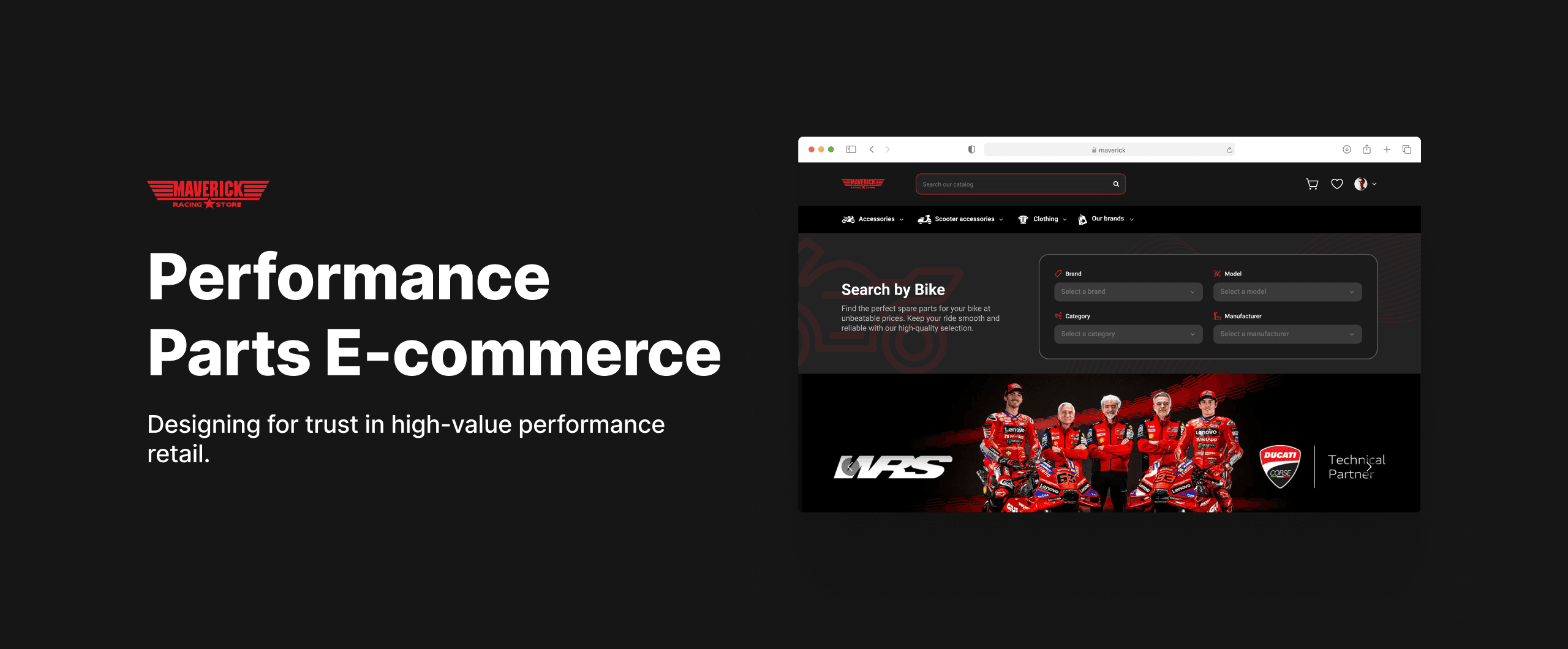
So I moved the compatibility search to the hero of the landing page the very first thing a user sees when they arrive. Select your brand, your model, and your category and the site surfaces exactly what fits your specific machine. No browsing, no wrong parts, no abandoned carts.
This one decision changed the entire information architecture of the site. The landing page stopped being a magazine-style homepage and became a functional tool that earns the rider's trust in the first 10 seconds.
Screens
Every screen in the Maverick flow was designed around one principle which is reduce doubt at every step. A rider should never reach a moment where they are unsure if they are in the right place, looking at the right part, or making a safe purchase.
Landing page
The landing page sets the tone immediately. The Search by Bike module sits in the hero which is the first thing a rider sees is a tool that answers their most important question before they have even started browsing. Below it, the Ducati technical partner banner, official resellers strip, best sellers, featured products, and new arrivals build credibility and depth without overwhelming the page. The newsletter section and footer complete the trust picture with a real company address and contact details.
Key Points:
- Search by Bike in the hero. Compatibility filter before browse, not after.
- Racing team and technical partner visuals build credibility above the fold.
- Three product sections (Best Sellers, Featured, New Arrivals) give different entry points for different rider intentions.
- Official resellers strip signals that Maverick works with legitimate brands.
- Real company address and contact information in the footer which is critical for trust on a high-value site.
Product page
The product page is where the purchase decision is made or abandoned. Everything above the fold is designed to give the rider confidence like (Star rating with review count, brand name, product code, availability status, price with discount, color and size selectors, quantity stepper, and a prominent Add to Cart button). The delivery countdown creates urgency that feels earned. Below the fold, detailed technical specifications, material breakdown, and compatibility notes give the rider everything they need to be certain before committing.
Key Points:
- Rating, brand, product code, and availability all visible before pricing builds context before asking for money.
- Delivery countdown "Order within 10 hours and 48 minutes and it ships today" creates real urgency.
- Color swatches and size selector inline no jumping to another page to configure the product.
- Technical features section with materials, specs, and homologation status are essential for safety-critical parts.
- "Discover more parts" section at the bottom is relevant upsell at the moment of highest intent.
- Compatibility warning shown clearly "Please compare the item code with the Arrow assembly chart". Without Reviews
With Reviews
Checkout (step by step)
The checkout is split into three screens showing the full progression which are empty state, steps completed, and review before final submission. The left side shows a clear progress stepper with four steps which are (Personal Information, Addresses, Shipping Method, and Payment). The order summary stays visible on the right throughout the entire flow so the rider never loses sight of what they are buying and what they are paying. The final review screen shows all completed steps with an Edit option on each one and a prominent Confirm Order button.
Key Points:
- Four-step stepper always visible on the left meaning the rider always knows where they are and what remains.
- Order summary persistent on the right consists of subtotal, shipping, insurance, and total always in view.
- Edit option on every completed step so no need to go back and start over to change one detail.
- Promo code field in the order summary which is accessible without leaving the checkout flow
- Confirm Order and Cancel clearly separated so the destructive action is never ambiguous.
- Shipping insurance line item shown transparently so there is no hidden fees at the last step. Step 1
Step 2
Step 3
Order tracking
The order tracking screen exists for one reason to remove anxiety after purchase. Three states are shown: order just placed, order in packaging, and order delivered. The visual timeline at the top shows each stage from Order Placed to Delivered with dates at each step. The right side shows the full order summary, contact information, shipping and billing address, and payment method so everything in one place so the rider never has to dig through an email to find their details.
Key Points:
- Visual timeline with four stages which are (Order Placed, Packaging, Out For Delivery, Delivered) with dates at each.
- Active stage highlighted in green so the rider sees exactly where their part is right now.
- Full order summary visible alongside the tracking → items, quantities, subtotal, shipping, total.
- Contact, shipping, billing, and payment all in one place so there is no need to search through confirmation emails.
- Invoice download button is useful for riders who expense parts through a racing team or club.
- Need help link so support is accessible directly from the tracking page without navigating away. Order Tracking in progress
Order Tracking completed
Order Tracking failed
Order confirmation
The confirmation screen closes the purchase loop cleanly and sets the rider up for what comes next. The green checkmark and "Your order is confirmed" message lands immediately. The full order details (contact, shipping address, billing address, payment method) are summarized below. Two clear actions are offered: Track Order in red and Continue Shopping as a secondary link. The option to save information for faster checkout next time is present but unobtrusive.
Key Points:
- Confirmation number shown immediately so the rider has proof of purchase before leaving the page.
- Track Order CTA in red is the most likely next action is given the highest visual priority.
- Full order details on the confirmation page so no need to wait for an email to see what was ordered.
- Save my information checkbox → opt-in, not pre-ticked, respects the rider's preference.
- Need help link visible so support is accessible at the moment of highest potential anxiety.
Orders history
The orders page gives riders a complete view of all past purchases in one place. Each order shows the order ID, date, estimated delivery, and a visual timeline of the current status. The order summary on the right shows exactly what was in each order. This screen is particularly important for riders who buy parts regularly and need to reference past purchases for maintenance records or warranty claims.
Key Points:
- Order ID and estimated delivery visible immediately so no hunting through account settings.
- Visual status timeline on every order → same pattern as the tracking page for consistency.
- Full order summary on the right (items, quantities, and prices at a glance).
- Invoice download available per order which is essential for riders who track maintenance costs.
- Need help link on every order meaning support is one click away for any order-specific issue.
Additional screens
The full design includes account management, saved cards and addresses, wishlist, sign in and registration, and a newsletter subscription flow. These screens complete the end-to-end experience and ensure the site functions as a real product rather than a collection of key screens.
Outcome
Maverick ended as a complete design for a product that did not ship but the work is real and the problems it solves are real. Every screen was designed to address a specific moment of doubt in a performance parts purchase journey.
The site feels like buying from the paddock because it was designed to answer the questions a rider actually has (does this fit my bike, is this store legitimate, will it arrive before my next track day, and did my order go through) not just to display products attractively.
The visual language supports the product. Dark, precise, performance-oriented without sacrificing the clarity and hierarchy that makes a high-value purchase feel safe.
What I would do next
1. Usability testing with real riders
- Test with 4 to 6 performance enthusiasts who have bought parts online before.
- Watch specifically how they use Search by Bike. Does the Brand → Model → Category order match how riders actually think about their machine.
- Measure whether the compatibility warning on the product page creates confidence or hesitation.
2. Mobile experience
- A significant portion of parts research happens on a phone even when the final purchase happens on desktop.
- Design a mobile-first version of the Search by Bike module and the four drop-downs need rethinking for a small screen.
- Simplify the product page for mobile → the two-column layout above the fold needs to collapse cleanly.
3. Saved bike profile
- A returning rider should never have to select their make and model again.
- One saved profile that pre-filters every search and flags compatibility automatically.
- Extend this to the account page so riders with multiple bikes can switch between profiles.
4. Performance metrics to track
- Search by Bike usage rate → what percentage of sessions start with the compatibility search vs direct browse.
- Add to cart rate from the product page → does the technical detail section increase conversion or create hesitation.
- Checkout completion rate → where in the four-step flow do riders abandon most.
- Return visit rate → do riders come back for their next service or return to a generic marketplace.